在搜索资料的过程中,看到很多总结的非常完善的文章,所以还是站在巨人的肩膀上,直接引用这些内容,需要的时候检索一下就好。
我也建议直接阅读文章中给出的这些链接去学习。
参考资料
- https://www.ruanyifeng.com/blog/2015/12/git-cheat-sheet.html 常用 Git 命令清单。推荐阅读
- https://www.ruanyifeng.com/blog/2015/08/git-use-process.html Git 使用规范。推荐阅读
- https://www.ruanyifeng.com/blog/2015/12/git-workflow.html Git 工作流程
- https://www.ruanyifeng.com/blog/2014/06/git_remote.html Git 远程工作详解
- https://cs.fyi/guide/git-cheatsheet Git 命令清单
- https://www.atlassian.com/git/tutorials/atlassian-git-cheatsheet Git 命令清单
- https://www.liaoxuefeng.com/wiki/896043488029600 Git 教程
- https://learngitbranching.js.org/ 交互式学习 Git 的网址
剩下的内容就记录一些对我来说需要记住和理解的 Git 小技巧和知识点。
命令别名
找到全局的 .gitconfig 文件,按照格式添加一下内容可以直接使用这些定义好的 git 别名。
命令行也可以 git config --global alias.co checkout
[alias]
	co = checkout
	cob = checkout -b
	br = branch
	brs = branch --format='%(HEAD) %(color:yellow)%(refname:short)%(color:reset) - %(contents:subject) %(color:green)(%(committerdate:relative)) [%(authorname)]' --sort=-committerdate
	ci = commit
	cm = commit -m
	save = !git add -A && git commit -m 'chore: commit save point'
	undo = reset HEAD~1 --mixed
	unstage = reset HEAD --
	st = status
	du = diff @{upstream}
	lg = log --color --graph --pretty=format:'%Cred%h%Creset -%C(yellow)%d%Creset %s %Cgreen(%cr) %C(bold blue)<%an>%Creset' --abbrev-commit
	history = log --oneline --graph
	last = log -3
- alias
- brs:用较好的可读性,列出所有分支的相关信息
git cm "在这里直接添加你想要的提交信息"- save:用定义好的提交信息,先提交工作区,再提交暂存区的所有内容,生成一次 commit。
- undo: reset 上一次提交的内容
- unstage: 暂存区回到工作区,类似撤销执行 git add .
- du: 比较和远程分支的内容差别。一般要先 git fetch 一下
- lg:用较好的可读性,列出当前分支下的提交信息
- history:和 lg 差不多,列出了远程分支的 head 指向
- last:列出最近三次提交
参考链接:
- https://www.liaoxuefeng.com/wiki/896043488029600/898732837407424
- https://snyk.io/blog/10-git-aliases-for-faster-and-productive-git-workflow/
全局配置和项目配置
Git的设置文件为.gitconfig,它可以在用户主目录下(全局配置),也可以在项目目录下(项目配置)。注意如果你通过 git config 命令设置了全局 --global 参数 配置,项目配置可能无法覆盖这些设置。
项目根目录下是 root/.git/config 文件、用户主目录下是 /usr/.gitconfig 文件
# 显示当前的Git配置
$ git config --list

# 编辑Git配置文件
$ git config -e [--global]

# 设置提交代码时的用户信息
$ git config [--global] user.name "[name]"
$ git config [--global] user.email "[email address]"
常用命令
提交
# 使用一次新的commit,替代上一次提交
# 如果代码没有任何新变化,则用来改写上一次commit的提交信息
$ git commit --amend -m [message]
分支
# 列出所有本地分支和远程分支
$ git branch -a

# 新建一个分支,指向指定commit
$ git branch [branch] [commit]

# 切换到上一个分支
$ git checkout -

# 建立追踪关系,在现有分支与指定的远程分支之间
$ git branch --set-upstream [branch] [remote-branch]

# 合并指定分支到当前分支
$ git merge [branch]

# 选择一个commit,合并进当前分支
$ git cherry-pick [commit]

# 删除远程分支
$ git push origin --delete [branch-name]
$ git branch -dr [remote/branch]
远程仓库同步
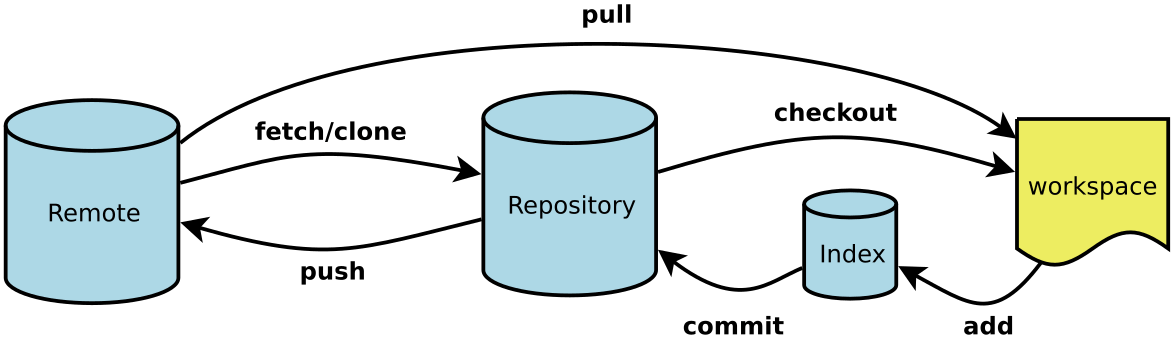
# 下载远程仓库的所有变动
$ git fetch [remote]

# git fetch 之后,想要本地进行合并
$ git merge origin/master
# 或者
$ git rebase origin/master


# 显示所有远程仓库
$ git remote -v

# 显示某个远程仓库的信息
$ git remote show [remote]

# 增加一个新的远程仓库,并命名
$ git remote add [shortname] [url]

# 取回远程仓库的变化,并与本地分支合并 = git fetch [origin] branch  then git merge origin/branch
$ git pull [remote] [branch]

# 上传本地指定分支到远程仓库
$ git push [remote] [branch]

# 强行推送当前分支到远程仓库,即使有冲突
$ git push [remote] --force

# 推送所有分支到远程仓库
$ git push [remote] --all
撤销
工作区:平时的工作目录。
暂存区:通过 git add 命令把文件/修改添加到暂存区。git commit 命令的作用是提交暂存区中的所有内容。
$ git stash
$ git stash pop
rebase
todo